


Smart DewHeater Controller 2x|CE-AASD2-94035
Smart DewHeater Controller 2x|CE-AASD2-94035
スマートデューヒーターコントローラー
残り 1 個
受取状況を読み込めませんでした
2年保証(電子部品は1年)
結露を防ぎ、電力を最適化。2つのヒーターを賢く制御する、インテリジェント・コントローラー。
- リアルタイムのデータを活用し、夜露の発生を防ぐために必要最低限の熱を供給します。無駄な加熱を抑えることで、大切なバッテリーを最大限に長持ちさせます。
- 「スマート制御」システムが外気温と湿度を常にモニタリングし、ヒーターの出力を自動的に調整。環境の変化に合わせて、常に最適な防露環境を維持します。
- Celestron純正のヒーターリングはもちろん、市販のヒーターバンド(要別売サーミスター)にも対応。
- 最大2つのヒーターと、架台などの12V DCデバイスを1つ同時にサポートします。
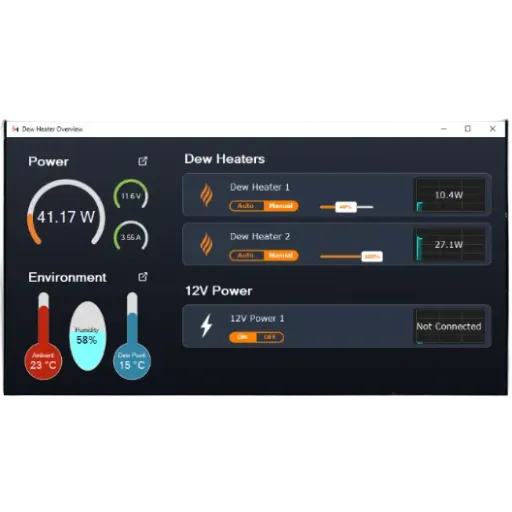
- NexStar+ハンドコントローラーやCPWIソフトウェアから直接データの確認や手動設定が可能。
- 望遠鏡のアリガタレールや三脚の脚にしっかりと固定できる設計です。
- 堅牢なメタルハウジングに加え、冷却ファンを内蔵。内部回路を保護し、過酷な観測環境下でも安定した性能を発揮します。
Item#:CE-AASD2-94035
製品仕様
製品仕様
| 標準仕様 | |
|---|---|
| ヒーターポート | 2ポート、RCAジャック、Celestron Dew Heater Ringsおよび他社製ヒーターストラップ対応 |
| サーミスタポート | 2ポート(各ヒーターポートに1つ)、2.5mmオーディオジャック、Celestron Dew Heater Ringsおよびオプションのcelestron Thermistor対応 |
| 12V DC電源出力ポート | 12V 2.1φDCジャック(外径5.5mm、内径2.1mm)、最大 7A |
| AUXポート | 2ポート、HC制御用Celestron架台への接続、オプションアクセサリーの接続も可能 |
| PCポート | USB 2.0 Type B、CPWIによるPC制御接続用 |
| 12V DC電源入力ポート | ネジ付2.1φDCジャック(外径5.5mm、内径2.1mm)、最大入力10A |
| 付属電源ケーブル | 片方にシガーライタープラグ、もう片方にネジ付2.1φDCプラグ(外径5.5mm、内径2.1mm)、長さ約3m、10A ヒューズ保護 |
| 環境センサー | 周囲温度と湿度を測定、熱的に絶縁するためにエンクロージャー「ブリッジ」に統合 |
| エンクロージャー構造 | 統合ファン付きアルミニウム |
| クランプ | CG-5およびCGEアリガタレールに対応(三脚脚部へのストラップ取り付けも可能) |
| 電子保護 | ヒューズ保護、逆極性保護、低電圧カットオフ |
| 重量 | 544.3g |
| サイズ | 139.7mm x 114.3mm x 82.55mm |


よく一緒に検討されている商品


スマート制御
電源管理
注意: 非常に湿度が高い環境で2つのヒーターをフル稼働させ、さらに12Vデバイス(架台など)を同時に接続する場合、消費電力はコントローラーの限界付近に達します。この構成では、PowerTank Lithium Proなどの標準的なバッテリー1個分では一晩の観測をカバーしきれない場合があります。長時間の観測には、より大容量の電源や、複数のバッテリーの併用をおすすめします。
信頼のインダストリアルデザイン
・Smart DewHeater and Controller 2x
・三脚固定用ストラップ
・コントローラー用電源ケーブル
・外部12V DCデバイス用電源ケーブル
・Celestron架台接続用AUXケーブル
・CelestronのDew Heater Ring接続用サーミスタ延長ケーブル
さらに快適な観測環境のために
Suggested Accessories
Categories
Q:
Celestron offers several options for powering the Smart DewHeater Controllers. Which one is best for my setup?
Celestron offers several options for powering the Smart DewHeater Controllers. Which one is best for my setup?
To answer this question, you’ll need to consider how, where, and for how long you want to run your system. Here are some critical specifications to evaluate for each potential power source.
- “Max current output” indicates the maximum amount of current that the power source can deliver to the controller. The current draw from all the devices you connect to the controller should not exceed this amount.
- For batteries only: The “battery capacity” specification will help you determine how long a given battery will run your system. First, add up the total power (in watts) required by all your devices. Then, multiply that number by the number of hours you wish to power the setup. If the result exceeds the battery capacity listed below, you’ll need a larger battery or more than one battery to last through the night. (Note: This specification does not apply to AC adapters, as their capacity is unlimited when they are connected to an AC power outlet.)
#18763 PowerTank Lithium LT
- Max current output: 3A
- Battery capacity: 73.3Wh
#18771 PowerTank Lithium
- Max current output: 3A
- Battery capacity: 84.4Wh
#18768 PowerTank Lithium Pro
- Max current output: 10A
- Battery capacity: 158.7Wh
#18774 PowerTank
- Max current output: 10
- Battery capacity: 84Wh
#18777 PowerTank 17
- Max current output:10A
- Battery capacity: 204Wh
#18778 AC Adapter – 2A
- Max current output: 2A
#18780 AC Adapter – 5A
- Max current output: 5A
Q:
I understand that the printed instruction manual I received in the box may not be the latest version. Where can I find the most recent version?
I understand that the printed instruction manual I received in the box may not be the latest version. Where can I find the most recent version?
You can always find up-to-date instruction manuals for any Celestron product by visiting the product’s page on www.celestron.com. Manuals are in the Support & Downloads tab. For your convenience, here are direct links to the controllers’ manuals:
• Smart DewHeater Controller 2x
• Smart DewHeater and Power Controller 4x
Q:
The threaded plug on my older Celestron AC Adapter - 5A (#18780) does not thread onto the controller's threaded power jack, and the power input becomes intermittent as a result. What is the problem?
The threaded plug on my older Celestron AC Adapter - 5A (#18780) does not thread onto the controller's threaded power jack, and the power input becomes intermittent as a result. What is the problem?
The older Celestron AC Adapter - 5A has a slightly different thread specification for the plug and will not connect properly to the Smart DewHeater Controller's power input jack as a result. We recommend purchasing a new Celestron AC Adapter - 5A, as the newer model has compatible threads on its plug.
Q:
Is there an ASCOM driver available for the Smart DewHeater Controllers?
Is there an ASCOM driver available for the Smart DewHeater Controllers?
Not currently but we expect to have one within the next couple of months. Please check back soon.


関連リンク
外部サイトに遷移します