


NexStar Evolution 8インチ SCT|CE-ASNE-12091
NexStar Evolution 8インチ SCT|CE-ASNE-12091
ネクスター エボリューション 8
残り 1 個
受取状況を読み込めませんでした
2年保証(電子部品は1年)
星空を、かつてない鮮明さで。一晩中楽しめるスタミナバッテリー搭載のフラッグシップモデル。
- iOSおよびAndroidに対応した無料アプリを使って、宇宙の探索へ出かけましょう。このアプリを使えば、NexStar Evolution望遠鏡を、スマートフォンやタブレットからダイレクトにコントロールすることが可能です。
- コンパクトでポータブルな203mmシュミットカセグレン鏡筒。StarBright XLTコーティングを採用し、Fastarにも対応しています。
- 高性能な真鍮製ウォームギアとモーターを採用したコンピューター制御自動導入架台。ギアのバックラッシュを低減し、追尾精度の向上を実現しています。
- 充電式リン酸鉄リチウムイオン電池(LiFePO4)を内蔵。最大10時間の連続観測に耐えうる十分な容量を備えています。
- 手動クランプや一体型キャリーハンドルを備え、産業デザインを刷新しました。さらに、2つのアクセサリートレイやスマートデバイス用のUSB充電ポートも搭載し、利便性がさらに向上しています。
Item#:CE-ASNE-12091
製品仕様
製品仕様
| 鏡筒情報 | |
|---|---|
| 光学系 | シュミットカセグレン式 |
| 口径 | 203.2mm |
| 焦点距離 | 2032mm |
| 口径比 | F10 |
| 接眼レンズ1の焦点距離 | 40mm |
| 接眼レンズ1の倍率 | 51倍 |
| 接眼レンズ2の焦点距離 | 13mm |
| 接眼レンズ2の倍率 | 156倍 |
| ファインダー | StarPointerファインダー |
| 天頂プリズム | 天頂プリズム(31.7mm径) |
| 鏡筒 | アルミニウム |
| 有効最大倍率 | 480倍 |
| 有効最低倍率 | 29倍 |
| 極限等級 | 14等級 |
| 分解能(レイリー) | 0.69秒角 |
| 分解能(ドーズ) | 0.57秒角 |
| 集光力 | 843倍 |
| 中央遮蔽 | 64mm |
| 中央遮蔽率(直径比) | 31% |
| 中央遮蔽(面積比) | 9.77% |
| コーティング | StarBright XLT |
| 鏡筒長 | 432mm |
| 鏡筒径 | 238mm |
| 鏡筒重量 | 5.67kg |
| アリガタレール | CG-5(幅狭) |
| 架台情報 | |
| 架台タイプ | コンピューター制御シングルフォークアーム経緯台 |
| 搭載可能重量 | 11kg |
| 高さ調節範囲(架台・三脚含む) | 1193.8mm - 1752.6mm |
| 三脚脚径 | 38.1mm ステンレススチール |
| 架台重量 | 7kg |
| アクセサリートレイ | あり |
| 三脚重量 | 5.44kg |
| 旋回速度 | 9段階の速度設定 - 最大速度 4度/秒 |
| 追尾レート | 恒星時、太陽および月 |
| 追尾モード | 経緯台、北半球および南半球 |
| GPS対応 | なし |
| アリガタレール互換性 | CG-5アリミゾ |
| AUXポート数 | AUXポート4基(ハンドコントローラーはいずれのAUXポートも使用可能) |
| オートガイドポート | なし |
| USBポート | あり(ハンドコントローラー入力および架台出力) |
| 電源 | 内蔵9.6V 4.5Ahリン酸鉄リチウムバッテリー(LiFePO4) |
| モータードライブ | DCサーボモーター |
| アライメント手順 | スカイアライン、1スターアライン、2スターアライン、オート2スターアライン、惑星アライン、クイックアライン、ラストアライメント、赤道儀北半球/南半球アライメント(赤道儀アライメントには赤道儀ウェッジが必要) |
| ピリオディックエラー補正(PEC) | なし |
| コンピューター制御ハンドコントローラー | 2行×18文字バックライト付液晶ディスプレイ、19個のLEDバックライト付ボタン、PC接続用USB 2.0ポート |
| NexStar+データベース | 40,000個以上(厳選された220個の「ベスト・ディープスカイ(深宇宙)天体」および太陽系天体を含む) |
| ソフトウェア | Celestron Starry Night Special EditionソフトウェアとSkyPortalアプリが付属 |
| 総重量 | 18.37kg |
| 付属品 | 鏡筒シングルフォークアーム架台・三脚アクセサリートレイ内蔵Wi-Fi内蔵リン酸鉄リチウムバッテリーNexStar+ハンドコントローラー40mmおよび13mm接眼レンズStarPointerファインダービジュアルバック天頂プリズム4プラグACアダプター |
| 補足情報 | |
| 太陽観測時の注意事項 |
|




Item:CE-ASNE-12091
ネクスター エボリューション 8 は、Wi-Fiを標準内蔵した世界初のシュミットカセグレン望遠鏡です。もう、煩わしいケーブルやハンドコントローラーに縛られる必要はありません。お持ちのスマートフォンやタブレットをタップするだけで、望遠鏡は自動的に夜空の主役たちへと向かいます。お使いのデバイスをNexStar Evolutionの内蔵ワイヤレスネットワークに接続し、専用の「SkyPortal」アプリで宇宙を探索しましょう。
アプリのプラネタリウム画面には、目の前の夜空がリアルタイムに表示されます。「今夜のベスト」リストを活用すれば、その時刻と場所で最も美しく見える天体が瞬時に分かります。セレストロン独自の「スカイアライン」機能もアプリに統合されており、3つの明るい星を捉えるだけでアライメント(初期設定)が完了。数分後には、宇宙の探求を始めることができます。
ユーザーの声から生まれた、史上最高の使いやすさ
NexStar Evolutionは、長年にわたりCelestronへ寄せられたユーザーからのフィードバックを凝縮して設計されました。「星空の下で最高の時間を過ごしてほしい」——そんなエンジニアたちの想いが、細部まで行き届いた設計機能として結実しています。
もう、重い外部バッテリーや絡まりやすい電源ケーブルを持ち運ぶ必要はありません。NexStar Evolutionは、民生用望遠鏡として初めて、大容量のリン酸鉄リチウムイオンバッテリーを本体に内蔵しました。
・10時間の「星空マラソン」: 高寿命なリン酸鉄リチウムバッテリーにより、一度の充電で最大10時間の連続観測が可能です。
・デバイスへの給電: 本体のUSB充電ポートを使えば、スマートフォンやタブレットを充電しながら観測を続けられます。
・賢い電源管理: 残量が少なくなるとインテリジェント電源管理システムが作動。省電力モードに切り替わり、可能な限り観測を継続できるようサポートします。
設置から撤収まで、一連の動作に一切の無駄がありません。
・素早いセットアップ: 人間工学に基づいた大型ハンドルにより、安全かつ迅速に機材を運搬できます。全金属製の堅牢な三脚には脚の目盛りが刻まれており、不整地でも瞬時に水平を出すことが可能です。
・マニュアル操作の自由度: 両軸に備わったマニュアル・クラッチにより、電源をオフにした状態でも手動でスムーズに望遠鏡を向けることができます。
・暗闇での利便性: 最大7個の接眼レンズを収納できる2つのトレイを装備。そのうち一つには、夜間の視認性を確保しつつ瞳孔への刺激を抑える「調整可能な赤色LEDイルミネーター」が備わっています。
天体写真の夢を叶える、クラス最高の追尾性能
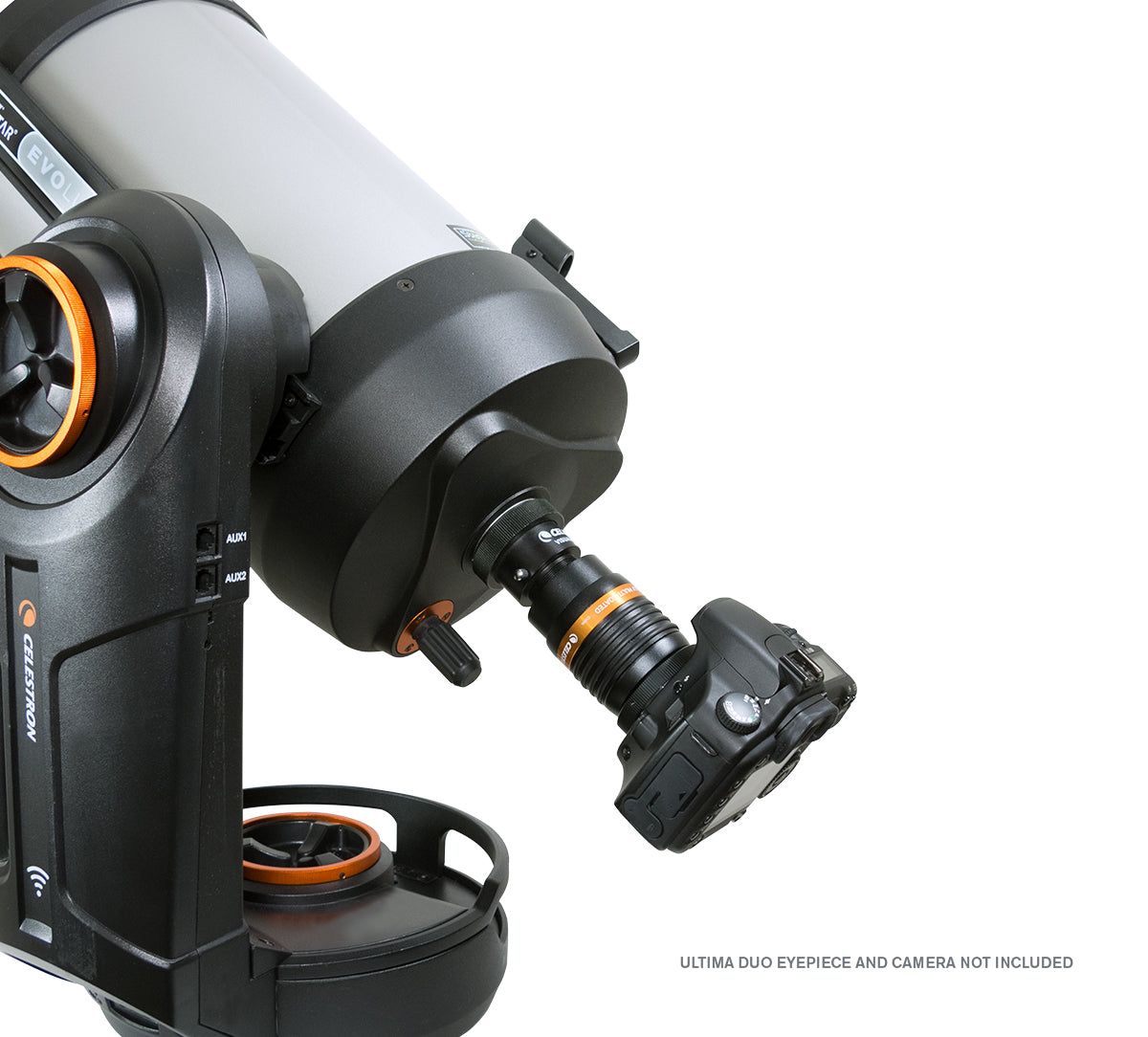
天体写真の世界へ一歩踏み出したい方にとって、203mm NexStar Evolutionは、優れたコストパフォーマンスと本格的な性能を両立した理想的な選択肢です。この価格帯のフォークマウント望遠鏡において、高精度な真鍮製ウォームギアと改良型モーターを標準装備しているモデルは他にありません。NexStar Evolutionの卓越した追尾精度により、デジタル一眼レフカメラを装着するだけで、オリオン大星雲をはじめとする深宇宙の天体を鮮明に捉えることができます。さらに、趣味が深まり、より長時間の露光による緻密な表現に挑戦したくなった時には、「HD Pro Wedge(赤道儀ウェッジ)」を追加することで、プロフェッショナルな長時間露光撮影にも対応可能です(※CPC三脚との併用時)。
伝統のシュミットカセグレン光学系には、セレストロン自慢の「StarBright XLTコーティング」が施され、眼視観測でも写真撮影でも、驚くほど明るくシャープな像を提供します。
また、システムを自分好みにカスタマイズするための拡張性も万全です。
・4つのAUXポート: フォークアームの上下に計4ポートを装備し、様々なアクセサリーを同時に接続可能。
・充実のパッケージ: クラシックなNexStar+ハンドコントローラーに加え、StarPointerファインダー、2種類のプローセル接眼レンズ、天頂プリズム、ACアダプターなど、観測に必要なアイテムがすべて同梱されています。
スマートデバイスでの操作が中心となる現代のスタイルでも、伝統的なハンドコントローラーによる操作でも、あなたのスタイルに合わせて宇宙を探索できます。
Suggested Accessories
Categories
Q:
What is the heaviest recommend load for mounting a camera in the Fastar / HyperStar configuraton?
What is the heaviest recommend load for mounting a camera in the Fastar / HyperStar configuraton?
We recommend a load of no more than 20 lbs. at 4.5 inches away from the 8" Schmidt corrector.
Q:
Why doesn’t my red dot finderscope match the image on the box/website?
Why doesn’t my red dot finderscope match the image on the box/website?
Celestron is making a change to the finderscope shipped with some Celestron telescopes. In some cases, you may receive a finderscope that is different in appearance than the one pictured on the gift box, manual, Quick Setup Guide, or website. We apologize for any inconvenience this may cause. Rest assured that the finders are identical in performance and features. The main difference is the location of the battery compartment and, therefore, the battery installation instructions.
If your red dot finderscope looks like the unit pictured here, you can ignore this message.

If you received a red dot finderscope that looks like the unit pictured here, follow the instructions below to replace the battery:

1. The battery compartment on this finderscope is located on top of the unit. Use a Philips-head screwdriver to loosen the screw holding the battery door closed. The screw is captured and will not fall out when you open the battery door.

2. Lift the battery door open to expose the CR-2032 button battery.
3. With your fingernail on either side of the battery, pry the battery up and out of the battery compartment.
4. Place the new CR-2032 battery, positive (+) side up, under the two copper battery clips at the front of the battery compartment.


5. Press the battery down to snap it into the plastic battery clips on the opposite side of the battery.
6. Close the battery door and tighten the Phillips-head screw to secure the door in place.
Q:
I’ve heard there is a firmware update for NexStar Evolution. What’s it for, and should I install it?
I’ve heard there is a firmware update for NexStar Evolution. What’s it for, and should I install it?
Yes! This important update improves your NexStar Evolution mount’s tracking performance and electrical stability, along with helping to prevent potential motor control board issues seen in a small number of units. It also adds a new feature that shuts down auxiliary devices when the mount’s internal battery gets critically low. To make the update process quick and easy, our engineers created a special version of the Celestron Firmware Manager (CFM) just for Evolution owners. We recommend all NexStar Evolution owners install it by visiting celestron.com/evocfm
| Manuals: | |
|---|---|
| 【日本語】NexStar 6SE / NexStar 8SE クイックセットアップガイド | Download |
| NexStar Plus Hand Control Manual | Download |
| Addendum for NexStar Evolution Telescopes | Download |
| NexStar Evolution Manual | Download |
| Schmidt-Cassegrain Optics Manual | Download |
| Software & Firmware: | |
| CPWI Software | Download |
| NexRemote Telescope Control Software | Download |
| Updating your NexStar Evolution mount with Celestron Firmware Manager (CFM) |
Download
In this document, we’ll review all the steps for updating a Celestron Evolution mount’s firmware with our tool, Celestron Firmware Manager (CFM). We’ve included separate instructions for Windows and MacOS. This document takes you to a special release of CFM exclusively for Evolution mounts. You need a wired connection to perform this update. Click for more details. |
| Other Product Files: | |
| SCT & EdgeHD Collimation Guide | Download |
| How to Align a Red Dot Finder to Your Telescope Video | Download |
| Solar Safety Warning | Download |
| What are the Sizes of Collimation Screws | View |
| Celestron NexStar+ Hand Control Troubleshooting Guide | Download |
シリーズ製品


関連リンク
外部サイトに遷移します